Using low cost AAC Apps vs. dedicated AAC devices (Part I)

From the last posting, a few comments were brought up about the pros and cons on AAC  apps on iDevices vs. the AAC manufacturers’ devices such as DynaVox. Some of other comments that I found on internet include:

Pros:
– apps are inexpensive and easy to get it as well as easier to learn.
– Apps on iDevices may be more attractive since it offer users a multi purpose  tool for their daily life or activities (music, games, e-mail, GPS) in addition to fulfilling their basic needs.

Cons:
– In most cases, you have limited technical support. Apps by their low-cost and mass marketed nature have no provision for specific AAC technical support.
– It is hard to identify the quality communication sets and customize the apps to meet each individual’s needs.  Family has to learn independently without educated technical guidance.
– Since iDevices are multi-use tools, they are not qualified for insurance funding.

However, I have noticed more AAC manufactures have started offering AAC apps on iDevices. Has anyone used these apps with your students or children? Has anyone received
good supports on apps from manufactures? Has anyone found any other AAC apps to be helpful with students?

Sono Flex
Cost: $99.99
Sono Flex from Tobii ATI and Go Talk Now from Attainment Company offer apps on iDevices.
http://itunes.apple.com/us/app/sono-flex/id463697022?mt=8
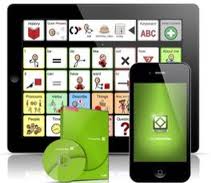
Sono Flex app

Main features:
– a comprehensive symbol based AAC vocabulary app for the iPhone, iPad and Tobii
Communicator that turns symbols and text into clear speech.
– pre-configured over 800 words and phrases.
– some 50 pre-installed contextual communication categories with groupings of words and phrases relating to specific situations. (e.g. “morning circle”, “getting dressed”, “personal” and “playground”)

Go Talk Now:
$79.99
GoTalk Now is an AAC app for iPad, which supports from beginner to experienced .
http://itunes.apple.com/us/app/gotalk-now/id454176457?mt=8
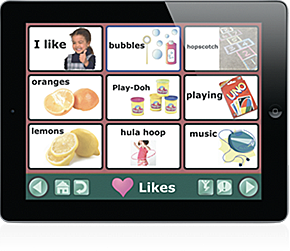
Go Talk Now app

Main features:
• 1-25 locations per page
• Use pictures from your iPad camera, photo library, or the built-in internet search
• Customizable backgrounds, boarders, and text.
• Auditory cues throughout give a brief verbal reinforcement before the selection of the desired button
• Customizable navigation tools can make the interface as simple or complex as the user can handle.  (for more details, http://attainmentcompany.com/featured/GoTalkNow/ )

More apps
7 Assistive Communication Apps in iPad App Store
http://blog.friendshipcircle.org/2011/02/07/7-assistive-communication-apps-in-the-ipad-app-store/
Posted in Assistive Technology, AT_AAC | Tagged | 78 Comments

Can free/Low-cost software and apps replace expensive educational software?

Most of the language tools on the market have common features such as text-to-speech, word prediction, spelling, highlighting, Thesaurus, Synonymous, etc.  I listed a few free/low cost software a few weeks ago, and some of these software also have similar features.  Do you think that we can replace some language tools on the market such as Kurzweil 3000 or WYNN with free software in the classroom?

How about apps on iPad/iPod touch?  Can these apps replace any educational software?  If you have any experience or opinions, I would appreciate your sharing of tips.

Posted in Assistive Technology, AT_Software | Tagged | 10 Comments

Free / Low-cost options

In my line of work as an Assistive Technology Specialist, I often see how technology can help individuals with special needs; however, I have found assistive technology devices and software on the market are typically, very expensive.  I have not tried all of the following free software, but I have listed many resources.  I am planning to add more, but if you have tried any of the following or other free software, please send me your feedback.

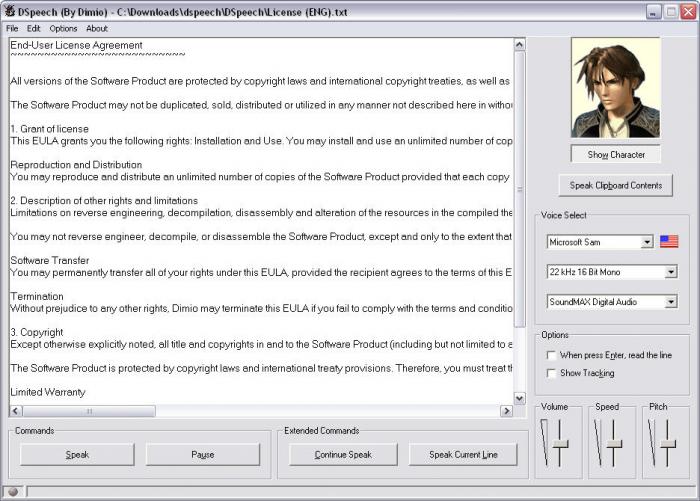
DSpeech User Interface

DSpeech
– Reads with highlighting
– Save the output as a WAV or MP3 file
– Voice selection
– Record a voice note
– Copy text or  open from a text file.
– It will not display a picture.

You can download it from here.

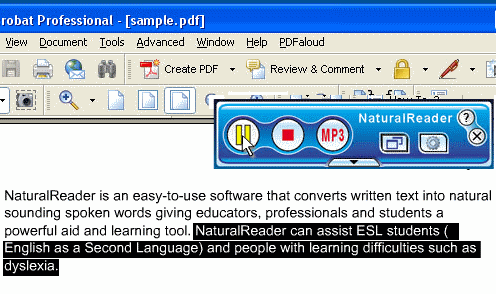
Natural Reader User Interface

Natural Reader
– Text to speech
– Floating bar
– You can select any text and press one hot key
– Magnify text.
– Text font can be changed
– Paid versions support audio output.

You can download a free version  from here.

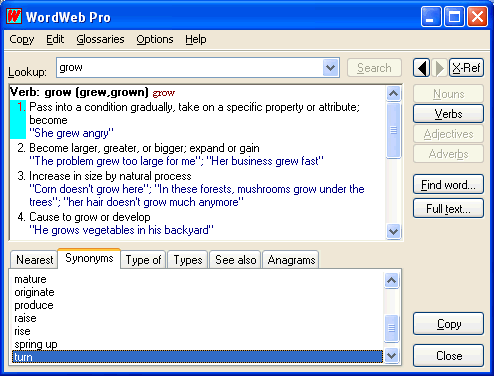
Word Web User Interface

Wordweb
The comprehensive English thesaurus and dictionary includes:
Definitions and synonyms, Proper nouns
Related words, 5000 audio pronunciations
150 000 root words, 220 000 word senses
Fixed web reference tabs

You can download a free version from
here.

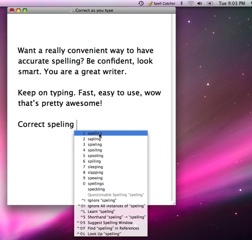
Spell Catcher
Specll Catcher

Spell Catcher
Spell Catcher  is a spell checking and writing software. Spell Catcher can watch for errors as you type, and suggest a list of items for you to select. ($39)

 You can download from here.

Additional Free/Low-cost software:

Web Anywhere
http://webanywhere.cs.washington.edu/wa.php
You interact with WebAnywhere using the keyboard.

Word Talk
http://www.wordtalk.org.uk/Home/
A free text-to-speech plugin for Microsoft Word.

If you have teach students with multiple or significant special need, Ms. Kate Ahem has excellent resources. For example, this is a link to her Free Software list.
Kate’s List of Free Software for Severe Special Education Classrooms

Downloadable and online free software resources by Ms. Marianne Wartoft.
Educational Freeware

Resources from Digital Text Services, Landmark College
Collections by Landmark College


Posted in Assistive Technology, AT_Software | Tagged | 2 Comments

Benefits of Assistive Technologies in schools

Assistive Technologies are the tools and strategies that help individuals with disabilities increase new ways to “assist” interactions and learning.

I think that assistive technologies help promoting independent participation in classrooms. Low-tech to high-tech assistive technology can provide customized access to the general curricula for students with disabilities expand classroom curricula.  Assistive technologies can help increasing their social, physical, and communication abilities.

To promote the use of assistive technologies in school, I asked a few teachers the following questions.

1. Do you use Assistive Technology at your school? If you do, what do you use?

2. If you have any assistive technology success story, would you mind sharing it?  (If you did not experience directly, do you think assistive technology will help your students.)

3. What areas of technology do you think you will need most?

A teacher’s response 1:

A teacher’s response 2 (read by a volunteer):

Posted in Assistive Technology | 4 Comments

What do you do now after you graduate?

The number of high school students with disabilities who are planning to continue their education in postsecondary schools is increasing.  Some may seek to continue two- and four-year colleges and universities.  Others plan to enroll in vocational and career schools.  Of course, many may wish to enter the workforce.  I think that many students hope to receive guidance and direction in transition, but they may not find enough information or may not know how to find the available support.

If you are a student, do you think that your school provides enough support by offering special training programs?  (I welcome all students’ ideas and opinions.)

If you are a parent, do you have any comments?  If you are already working as a professional, do you have any suggestions?

Posted in Transition | 3 Comments

Technology in Education

ATPDC (www.atpdc.org) is committed to improving the District of Columbia’s capacity to provide appropriate assistive technology devices and services for all Washingtonians with disabilities.

Posted in Assistive Technology | 1 Comment