Low-cost Literacy Tools

Many research studies have found that the combination of both visual and auditory presentation of text used by Text-to-Speech (TTS) software increases comprehension skills, especially for struggling readers. Some of the higher-priced literacy software ($800 – $1300), such as Kurzweil 3000, WYNN Wizard, Solo, and Read Write, offer TTS features. Literacy Software also includes other features such as word prediction, study tools, and research tools. However, many schools face budgetary challenges to provide literacy technology to their students due to the cost. Parents also find it hard to purchase this higher priced software for their children with learning disabilities. The Premier Literacy Package bundle (www.readingmadeez.com) offers a collection of literacy tools that support individuals with learning disabilities – especially developed for reading and writing for less than $280. Consumers can purchase a particular module of the package such as converting text to audio file for less than $70.

[youtube=http://www.youtube.com/watch?v=wvZFjjXE8jA]

Video: Text-To-Audio – PDF Options tutorial from Premier Literacy

Posted in AT_Software | Leave a comment

Live Olympic 2012 apps

I found a few postings of apps for Olympics 2012 such as NBC Live Extra for iPad and iPohne and PlayUp Olympics 2012 Special.  It sounds that the application can offer real-time updates of events, and others have commented the streams are pretty close to live, with some delay. I think it is still pretty nice to watch games anywhere on-the-go.

Review of NBC Live Extra for iPad and iPhone
PlayUp Olympics 2012 Special
London 2012: Official Results App for the Olympic and Paralympic Games

Posted in Uncategorized | Leave a comment

Insignia – Narrator Advanced HD Radio Reader Service

HD Radio Broadcasting has moved quickly into the mainstream with more than 2,100 stations in key markets across the United States,” said Joe D’Angelo, a Senior Vice President of Advanced Services at iBiquity. The Insignia™ – Narrator Advanced HD Radio with Radio Reader Service ($99) is now available in July at Best Buy.  It is designed for persons who are visually challenged or who are blind.  Some of the features include: store information about radio content by using the Bookmark features.  Or by pressing a simple key combination when first powering on the Narrator, you enable all of its audio feedback features.

For more information, check these websites.

http://www.insigniaproducts.com/products/portable-audio-players/NS-CLHD01.html

http://www.reuters.com/article/2012/05/18/idUS150650+18-May-2012+HUG20120518

Posted in Uncategorized | 2 Comments

Graphing Calculators for High School Students

If you are considering a graphic calculator for High School, you may know about Texas Instrument TI 83 or TI 84 calculators, but have you ever considered an HP 39GS?

[youtube=http://www.youtube.com/watch?v=bBl3sFP11no]

A video is dated 2010. The current price has been changed.

Some high-end calculator users prefer HP calculators. Here are some links about the HP 39GS calculator, which seem to have more math features and functions than the TI 84.

Colin Croft, “The HP Home view”
http://www.hphomeview.com/index.htm
HP Aplet

If you have any opinions or experience, please share.

Posted in AT_Math | 2 Comments

Transition Strategies for AAC users

Bryen, Potts and Carey (2007) reported in their article, “So you want to work?” that individuals with disabilities who use AAC had an extremely low rate of employment. Today, even though technologies have advanced to support individuals who rely on AAC, they continue to face barriers to employment in America.

Click here: My thoughts

Do you have any suggestions to promote their employment opportunities or know any blog sites to discuss about the topic?

Posted in Uncategorized | 1 Comment

Tobii Gaze Interface for Windows 8

From Youtube: Tobii Technology demonstrates how Gaze interaction makes it possible to point and interact in ways that are superior to both touch and mouse. It changes the user interface for regular computers as fundamentally as touch has for handheld devices.

[youtube=http://www.youtube.com/watch?v=3MoGzTdQnX8]

Read more here.

Posted in Uncategorized | 2 Comments

Have you heard about the Speech-to-Speech (STS) service?

A founder of STS, Dr. Bob Segalman (known as Dr. Bob) declared that “Daily independence is often taken for granted.”

Dr. Bob wanted to enable People with Speech Disabilities (PSDs) to have an accessible telephone service. This service, called Speech-to-Speech (STS) provides Communication Assistants (CA’s) for people with difficulty being understood by the public on the telephone. It is available for business, medical, and personal communication.

We would like to make people aware of this service.  For DC residents, Mr. David Bauer, the founder of the Cerebral Palsy Group (http://www.thecpgroup.org/) and Matt Myrick, Channel Manager from AT&T will be able to demonstrate how this service works for us.  In addition, the founder of the STS Service, Dr. Segalman will be able to attend the session remotely.  We are planning this session in March. Please contact me at democenter@uls-dc.org for more information. For those who are not able to join us, please visit the website to find more information. http://www.speechtospeech.org/

A picture taken from Speech to Speech website

A picture taken from Speech to Speech website

Posted in Uncategorized | 1 Comment

Math Software for Tablet PCs and Interactive Whiteboards

Fluid Math

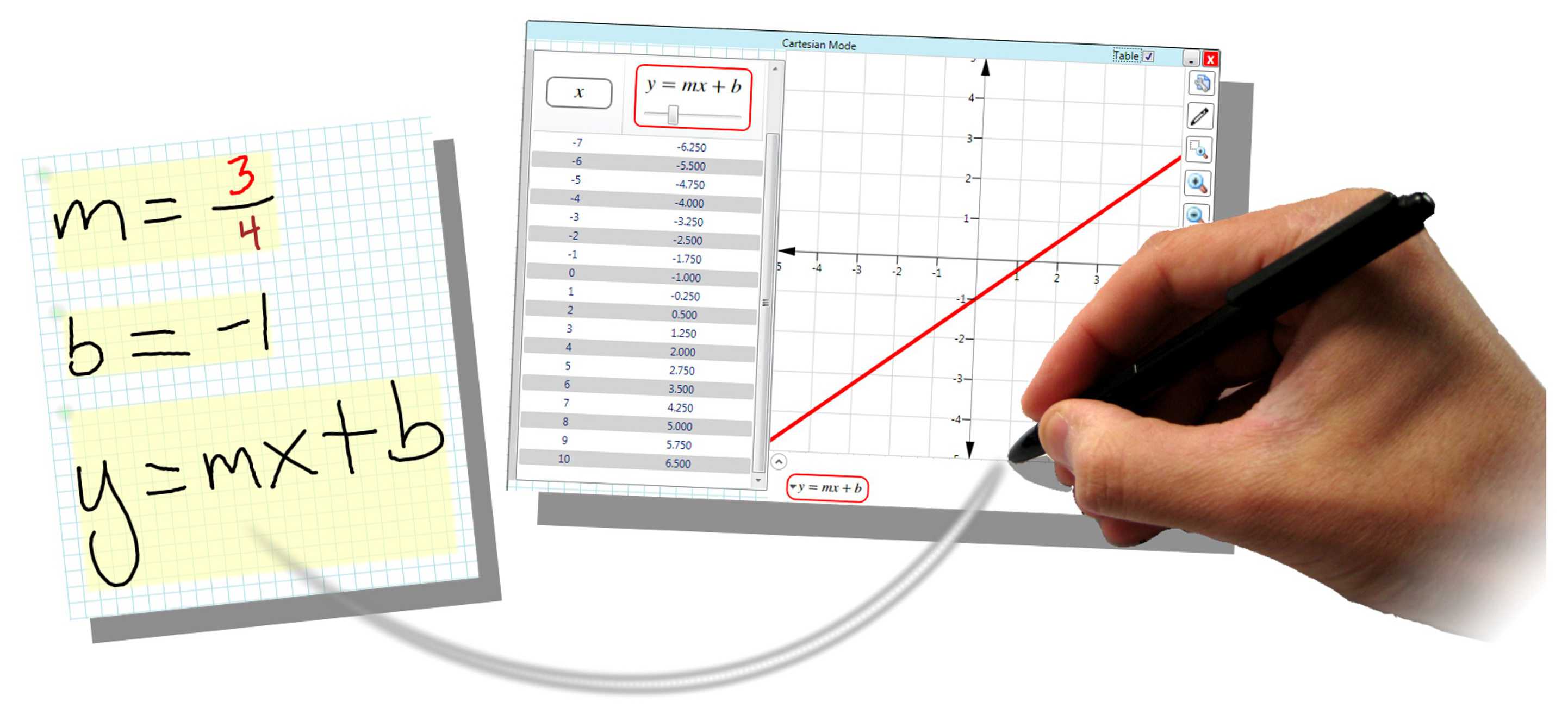
There are two versions of FluidMath. One for Tablet PCs and one for Interactive Whiteboards. This new math app is compatible to a graphing calculator.  However it does have a more interactive approach and allows a nice interface to a whiteboard for instructors and would also allow some students to be able to use a tablet in place of a graphing calculator.  This may allow some students with the option of possibly using a tablet for their calculator.

Features:

  • Accurate recognition of handwritten math
  • Numeric and symbolic calculator functionality
  • Interactive creation and exploration of graphs
  • Animate hand-drawn diagrams by associating math and sketches
Fluid Math

Fluid Math

http://www.youtube.com/FluidMath

http://www.fluiditysoftware.com/

Posted in Assistive Technology, AT_Math | Tagged | 3 Comments

Using low cost AAC apps vs. dedicated AAC devices (Part II)

After I posted the topic, “Using low cost AAC apps vs. dedicated AAC devices” at the Quality Indicators for Assistive Technology Website (QIAT), I received some replies via e-mail. Most replies have a common thread and include suggestions so I would like to share their thoughts.  All stated that it is important to have an evaluation for selecting an AAC device or apps, and they pointed out that using free communication apps have both negative and positive aspects.

Pros:
– Since these apps are cheap, professionals and parents can afford to purchase them and use them with students.

– Professionals and parents are becoming more aware of the potential that AAC can provide for students.

– AAC apps on a portable devices are easy to carry and can be used as a multiple purpose device (e.g. PDA).

– Motivates students to use the communication device (e.g. AAC apps on an IPad) since the iPad itself is very attractive to many people.

– AAC apps on a portable device can be used to conduct informal evaluations for simple communication needs.

– One company, Alexicom Tech, sent me a link about their story and their inspiration, Alex.

Cons:
– Since it is easy to purchase and install these apps, they are using them without any formal evaluations.  Some may be used effectively, but many students will not be able to progress and develop their communication skills as far as they would with a better selected tool.

– People may hear about communication apps from friends or strangers without evaluating  the quality of the components.  Some of these communication apps have useful components, but at the same time, they are not as sophisticated or appropriate as the communication available in AAC devices.

– People using these apps may be teaching students to label items or identify items, but mat not be correctly teaching how to develop true communication skills.

Additional feedback and comments from AAC experts from earlier postings are: 

-Good free or low cost apps include Speak It ($4.99) and free NeoSpeech Paul app ; you can use a iHome capsule speaker ($15) to amplify on an iPod, and it has an eight hour battery life and works great.

Saltillo Nova Chat 7 now offers a dedicated device built on the Android platform.

– An unlocked Maestro from DynaVox, can outperform an iPad.

– If you can get a device paid for by insurance, the cost to the end user can be minimal or non-existent vs. AAC apps on iDevices are not covered by insurance.

– AAC is very individualized.  Any good AT evaluator will look at features of a variety of tools such as Dynavox, Apple, PRC, AMDI, AbleNet, etc.

For more details, please read at the Comments” section, “Can free/Low-cost software and apps replace expensive educational software?”

Most experts agree that AAC apps on iDevices and Android devices have become better and more affordable, but there is a concern of the misapplications of these tools. Everyone agrees that the trend is beneficial, but the solutions have to be individual based.

I agree with the quote referenced in the ASHA Leader, October 2011, “we should remember to first focus on matching a client’s needs, strengths, and skills to the most appropriate tools and strategies” (Shane & Costell, 1994).  We will need to be aware of possible mismatch of AAC apps on iDevice platforms to the client’s actual needs if we select the options without careful evaluations.

Posted in Assistive Technology, AT_AAC | Tagged | 2 Comments

No web access

Many educators are actively using or considering the use of free e-learning technologies in their classrooms.  Most teachers report that blogs create communication opportunities and can be used for collaborative and social networking, as well as an instructional tool within their classrooms. The new 21st century learning environment will provide many benefits to those who have access. The internet offers opportunities for those with disabilities to interact with others in the world. However, the use of technologies raise concerns with accessibilities and possible exclusion of disabled individuals.

Mary Zajiceck of the Department of Computing at Oxford Brookes University, stated in her report, “Web 2.0: Hype or Happiness?”, using Web 2.0 sites rely on fast internet speeds or new communication technologies, which older people cannot afford. As a result, those who do not have Web access will become excluded.   The same constraints definitely apply to many young people with disabilities or low-income families. As far as accessibilities, there are lots of discussions and suggestions about UDL; However, I would like to ask educators what kind of accommodations and considerations  you provide for students with special needs when you are planning to implement web 2.0 tools in your classroom. I would like to hear about your experience about all areas of constraint, including the possible unavailability of equipment or internet access by children of impoverished parents or disabled individuals.

Weblinks:
Web 2.0: Hype or Happiness?” by Mary Zajiceck

2 million children with no web access at home
http://philbradley.typepad.com/phil_bradleys_weblog/2010/12/2-million-children-with-no-web-access-at-home.html

Posted in Assistive Technology | Leave a comment